Fee Payment Options
We offer flexible payment options to families:
- Online – pay with your credit card through MyCBE
- If unable to pay online, pay with your debit or credit card at your child’s current or previous school, or pay by mail.
If you cannot afford to pay your fees, you may be eligible to apply for a waiver. Central waivers apply only to central fees (e.g., busing, school supplies and lunch supervision), while school-based fees are reviewed separately by the school.
Security | to protect your personal and financial information, we do not accept credit card information over the phone, by fax or by mail.
Pay Online With MyCBE
You can pay outstanding school fees online with MyCBE.
You can sign up for services like transportation or lunch supervision, pay fees and view or print receipts and statements for all of your children in one location. The system is mobile-friendly and works with your smartphone or tablet.
Paying online is quick and easy. Online fee payment offers flexibility in payment methods, convenience, and real-time information on payments including receipts and statements.
Pay In Person
If you are unable to pay online through MyCBE, your child’s school can accept debit or credit card payments in person.
If your child is no longer enrolled at a CBE school, payments can be made at the last CBE school your child attended.
See our School Directory.
Debit and Credit card payments are not accepted at the CBE Education Centre main office.
Pay By Mail
You may mail a cheque and documents.
For prompt and accurate application of payment, make sure that the student’s name and ID number are included with payment.
Never mail cash or credit card information.
Mailing Address
Calgary Board of Education
Attention: Student Fees
1221 - 8 Street SW Calgary AB T2R 0L4
Questions Related to Payments or Fees
Email: studentfees@cbe.ab.ca
How to Find & Pay Your Fees
Sign in to MyCBE and click on the Fees, Waivers & Service Registration application.
You can choose to pay the fees in full, or make partial payments throughout the year.
Don't Have a MyCBE Account?
Parents / Guardians can visit MyCBE to create a new account.
You will need to use:
- The Email on File at Your Child’s School
- Child’s CBE Student ID Number
- Child's Birth Date
The MyCBE sign-in page contains instructions on requesting an access key for students. The access key(s) will be sent by email. Families can use it to create an account, and add their children to their account.
Billing Information
The information on the invoice is pulled directly from our student information system.
All financial arrangements (legal or otherwise) for split households are the responsibility of the family to manage.
Partial Payments
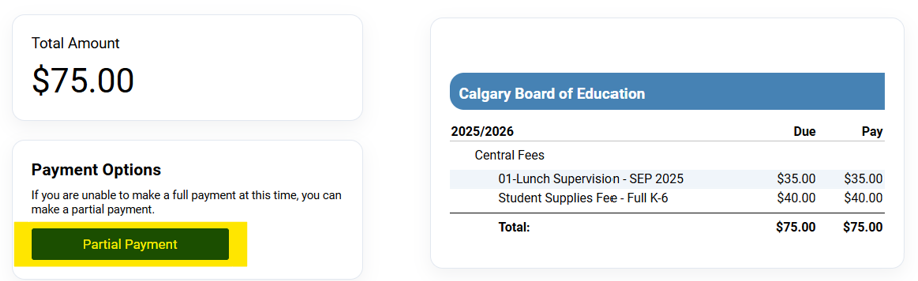
To make a partial payment, add the fee to your shopping cart in MyCBE. At checkout, select the Partial Payment option and enter the amount you would like to pay. Additional payments can be made at any time until the balance is paid in full.
Unable to Pay?
A Central Fee Waiver is available for families who can’t afford to pay school fees. Look for the Central Fee Waiver Application under your child’s name in your MyCBE account.
Fee Deadlines & Collections
- Fees are due once they are assigned to a student account
- Payment in full is expected by the end of the school year
Notices are sent to families with unpaid fees.
Any balances remaining unpaid beyond 180 calendar days may be referred to a third-party collection agency.
Contact
Questions about fees & waivers
Last modified: 2026-11-26 20:24:26.187268 +0000 UTC